

These are the Exam Taker Requirements for your upcoming WSET Remote Invigilation Exam. Please take time to understand the information so you can ensure Remote Invigilation is a suitable exam method for you.
WSET RI Exam Taker Specific Requirements and Restrictions
Language Requirement
- Remote Invigilation is currently only available in English. The use of translators is not permitted, and if you use one it must be turned off for the exam.
Device Requirements
- A laptop or desktop computer running Windows 10 or 11, MacOS, or Chromebook for use as the Primary Device.
- A mobile or tablet with a camera for use as Secondary Device
- See more device specifications here: Device Requirements
Territory Restrictions
- It is not possible to take an RI exam within Mainland China or the UAE due to technological restrictions. WSET will not be liable for any costs associated if you choose to take this exam or any RI retakes. Contact your WSET APP if you have any questions.
Legal ID Requirement
- You need a legal / government-issued ID for your RI exam so we can verify your identity during the exam. Verify with your APP that you are enrolled to the exam with your government issued full name as shown on your legal identification. You will submit this ID during your RI exam. Using any nicknames will delay your results.
- You may receive post-exam communications from your APP requesting a copy of your ID. If your APP requests a copy, please provide it to them as soon as possible. If WSET does not receive validation of an ID within 6 weeks, we will not be able to process your exam.
Work-related devices / Wi-Fi Requirements
- Attempting to use a device and/or a VPN that is intended for work purposes may have restricted access and admin rights installed. Personal devices should be used whenever possible. If you are using a work device, you may find that you are not able to use the platform due to settings and security applied by your IT. This may cause issues when trying to access the ProctorExam platform and therefore it is recommended to use a personal laptop. Note: We cannot guarantee a successful testing experience if a work device is used.
- Public / Work Wi-Fi does not guarantee a successful testing experience and technical issues experienced as a result are not covered by WSET Special Consideration Policy
Exam Room Setup Requirements
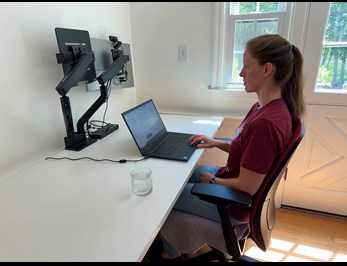
- Choose a private exam room where the secondary device can be placed approximately 2 meters / 6 feet away from you OR at least provide a side view of yourself, your desk, your screen and your exam environment. See example below:
- Set up where the Wi-Fi signal is strongest. A wired connection is a more stable connection.
HELP
- Use this form to submit your query to WSET staff if you have any questions about the requirements that you Approved Programme Provider is unable to answer.